AI for lawyers, inside Word.

edit.legalMicrosoft Word

AI legal assistant for lawyers — drafting, reviewing and searching Italian legal sources directly inside Word.

EU-hostedGDPR-compliantMicrosoft verified publisher

Review

Native Word comments

Playbook

Automatic checklists

Draft

Pleadings and contracts

Search

Italian Supreme Court & case-law

What edit.legal for Microsoft Word is

edit.legal is an AI legal assistant that lives directly inside Microsoft Word as an official add-in. It drafts pleadings and contracts in Italian, reviews documents with native Word comments and tracked changes, searches 300,000+ Italian Supreme Court rulings and statutes (Codes, special laws, the Constitution), and runs custom clause-by-clause playbooks. It is published on Microsoft AppSource by a verified publisher, hosted on EU infrastructure, and GDPR-compliant. Installation is free; AI features are included in credit-based plans.

Who it's for

Designed for Italian lawyers, law firms, in-house counsel, notaries and accountants who work daily in Microsoft Word on contracts, court filings, opinions, demand letters and briefs. Works in Word desktop (Windows and macOS), Word on the web and Word for iPad. You don't need to export documents to an external platform: the file stays in your cloud (OneDrive, SharePoint, local).

What it actually does

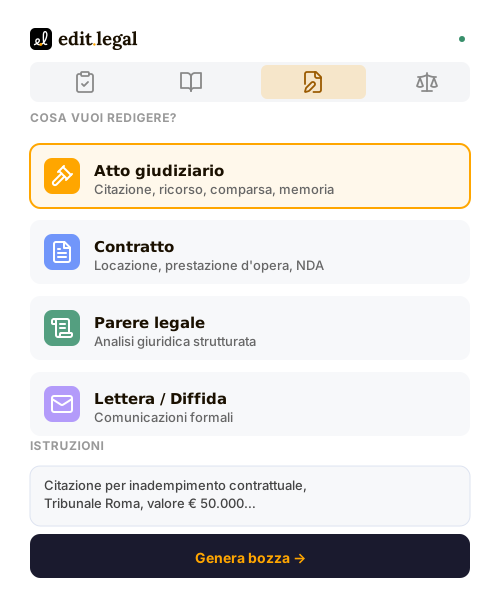
  • AI drafting of court filings (summons, appeals, briefs, memoranda) and contracts (NDA, lease, service agreement, employment)
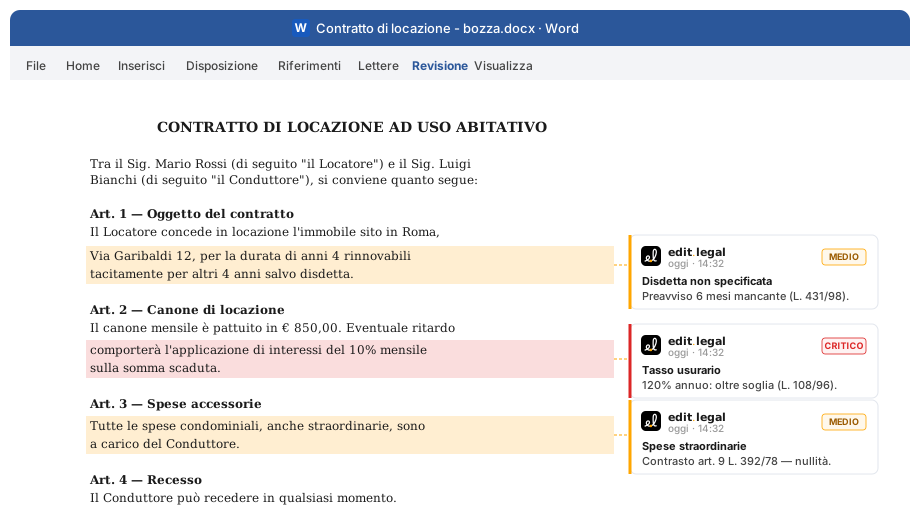
  • AI contract review: native Word comments with severity (critical, medium, informational) and statutory reference
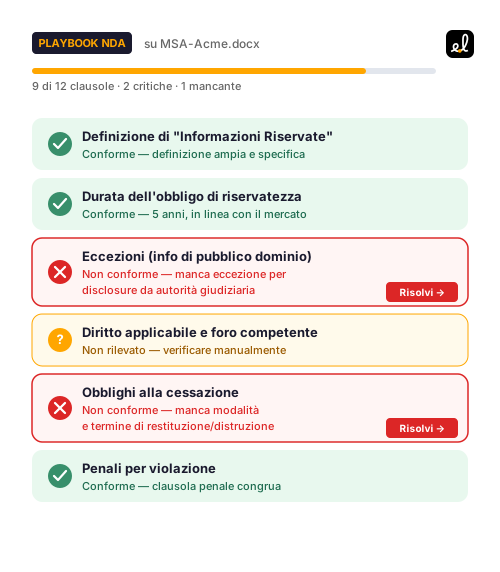
  • Custom playbooks run by AI clause-by-clause with exportable compliance status
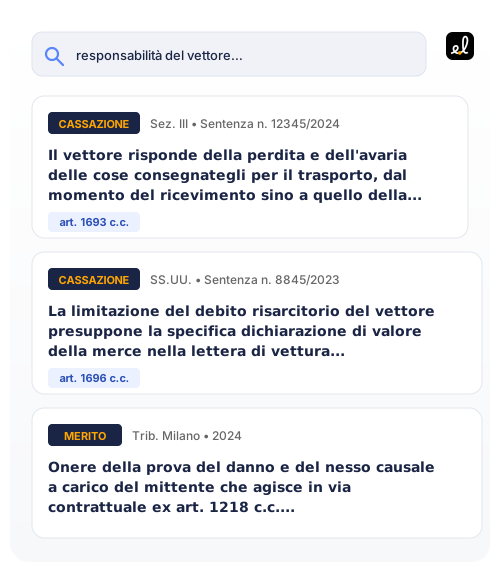
  • Semantic search across Italian Supreme Court rulings (including Joint Sections), Codes (civil, criminal, civil procedure, criminal procedure), the 1948 Constitution and lower-court case-law
  • Citations linked to Normattiva and CED Cassazione
  • Multi-tenant Microsoft Single Sign-On, Google SSO or email OTP

Contract review

Legal review, native to Word.

edit.legal opens the contract in Word and annotates risks, regulatory gaps and inconsistencies directly as native comments. You work where you already work, no exports.

  • Comments with severity (critical, medium, informational) and statute reference
  • Suggested edits applicable in one click as tracked changes
  • Automatic comparison against Italian Codes, special statutes and bar guidance

Ready-made playbooks

Your contract checklists, run by AI.

Build custom playbooks or use ready-made ones. AI checks every clause and annotates findings as native comments in the Word document.

  • NDA
  • Lease
  • Service Agreement
  • Sale
  • Employment
  • + Build yours
  • Clause-by-clause compliance status, exportable for the client
  • Customise rules to your workflow, share across the firm
  • Ready-made templates that speak your professional language

Supported formats

Pleadings, drafted in seconds.Template, language, format.

Pleading, contract, opinion, letter: describe what you need in plain language and get a draft ready to be customized.

  • Summons
  • Appeal
  • Brief
  • Memorandum
  • NDA
  • Demand letter
  • Full document or single-clause generation, with fillable fields
  • Format tailored to the document type (judicial, out-of-court, contractual)
  • Inserted directly into your Word document with consistent typography

Verified sources

Codes, statutes, Supreme Court,your case.

Semantic search across 300,000+ rulings, Italian codes and statutes. Citations verifiable against the original source, always.

  • Supreme Court (Joint)
  • Civil Code
  • 1948 Constitution
  • Lower court rulings
  • Criminal Code
  • Semantic search by legal concept, not just keywords
  • Filters by practice area, section, court, time period
  • Open the official source (Normattiva, Cassazione) with one click

FAQ

What do I need to use the add-in?
Microsoft Word (Windows, Mac or Web) and any Microsoft, Google or email account.
How do I sign in?
Three options: Microsoft SSO (multi-tenant — any organisational or personal account), Google SSO, or email OTP.
How is my document data handled?
The add-in only reads the portions you select, hosted on EU servers, never used to train AI models. Microsoft Graph permissions are limited to User.Read.
Is it free?
Free to install with a generous free tier. Advanced features require a paid subscription managed directly by edit.legal.
How do I uninstall?
Insert → My Add-ins → Manage → Remove. Your edit.legal account is unaffected and continues to work on the web.

edit.legalMicrosoft Word

Draft, review and search Italian legal sources — directly in Word.

Install on Microsoft AppSource